
PESPA SYSTEMS
Menu
  • External link opens in new tab or window
  • External link opens in new tab or window

Services

CADMark software for AutoCAD
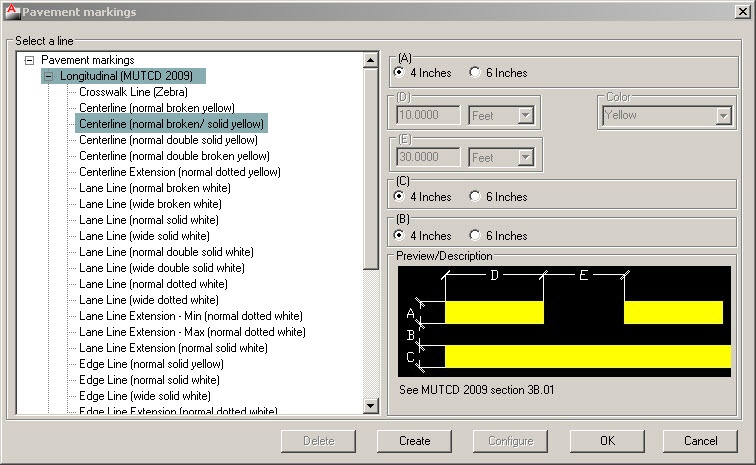
 

CADMark software saves time as M.U.T.C.D.  and A.A.S.H.T.O standards are built into the program and the software can be used to generate professional roadway drawings on - fly:

- Vehicle Swept Path Analysis
- Pavement Markings, Traffic Signs & Pavement Text
- Intersection Sight Triangles, Stopping & Passing Sight Distances
- Temporary Traffic Control Zone (Workzone) and Street Parking Spaces


Key Features


Column
  • Vehicle Swept Path Analysis
Select a vehicle from AASHTO library of design vehicles
Create a custom vehicle
Adjust the speed, superelevation and friction of the turning vehicle
Generate forward and reverse turns
Report vehicle swept path information

  • Roadway Markings

Draw a pavement marking line between points
Draw a pavement marking line at a specified distance from an existing object
Move a pavement marking line in other ways using grips
Extend (continue) a pavement marking line
Convert drawing object to pavement marking
Draw pavement symbol
Create rumble strip, raised pavement marking or delineator
Generate pavement marking reports
Draw chevrons
Draw pavement marking leaders
Draw pavement word (text)
Modify pavement word (text)
Assign street name to pavement marking
Create work zone
Associate traffic control device or traffic sign with work zone
Create landscape, streetscape

  • Roadway Signs

Insert traffic signs from a library of objects

Add traffic signs to a library

Column

  • Roadway Sight Distances

Generate Intersection Sight Triangles (IST)
Generate Stopping Sight Distances (SSD)
Generate Passing Sight Distances (PSD)
Generate and report sightlines based on design vehicle, design speed, time gaps, superelevation and skew angle

  • Roadway Street Parking

Create and report street parking spaces

  • Compatibility

AutoCAD 2013 - 2019 (except AutoCAD LT)

Column


+1.6044347255


Column


demo@pespasystems.com


  • External link opens in new tab or windowClick to edit


Copyright 2021 PESPA SYSTEMS


close lightbox